External vs. Internal Explained

UX Series: Part 1
In a previous post, we clarified the different categories within Enterprise Search. We focused on a common subset often referred to as Workplace Search—a term frequently confused with Enterprise Search. We explained that while Workplace Search focuses primarily on information discovery within an organization, it is just one piece of the broader enterprise search landscape.
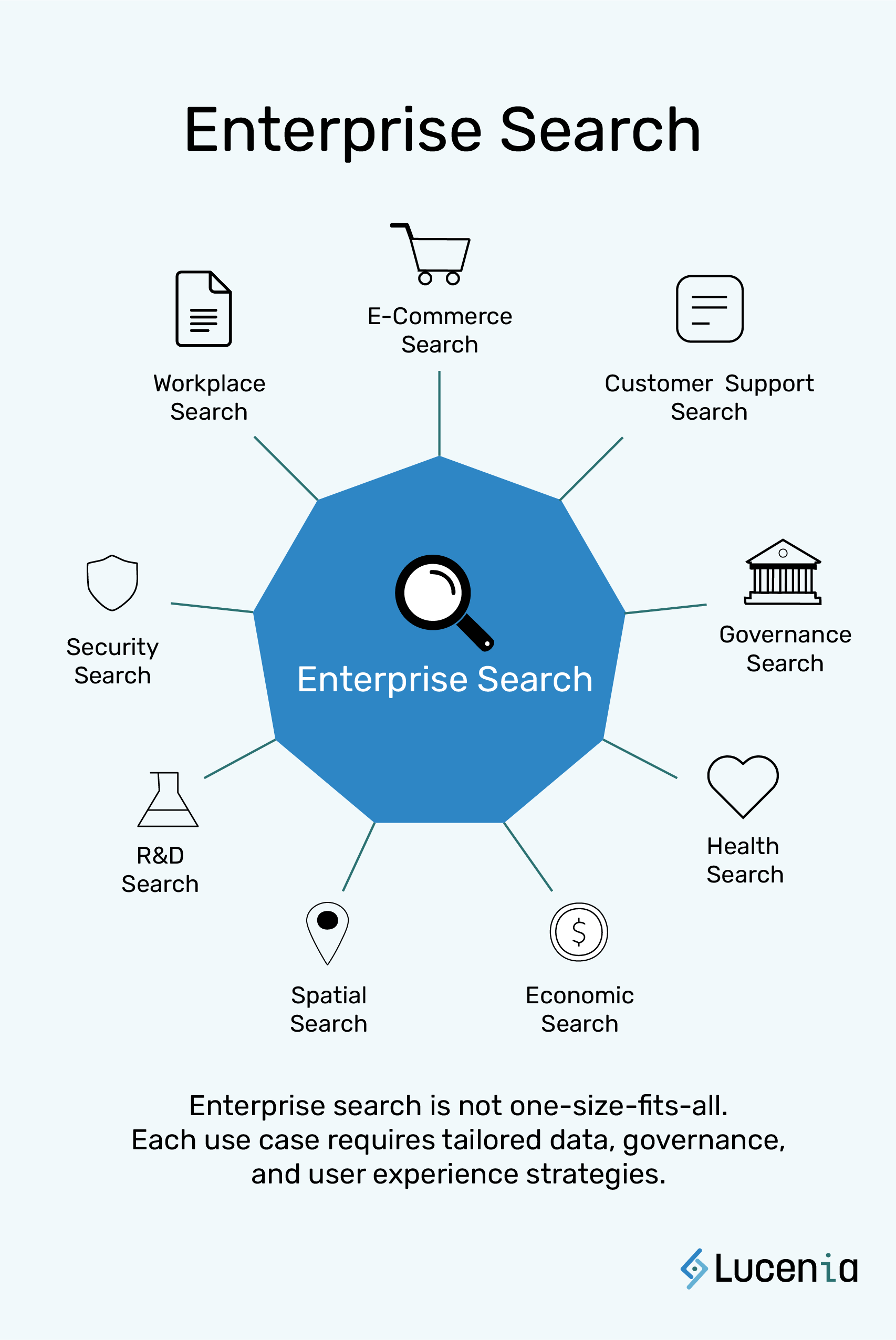
However, Enterprise Search, as a whole, is not a singular, uniform solution. It is also often confused with analytics (that will be discussed in a later blog.) Enterprise Search is better understood as one coin with two distinct faces.
Organizations often talk about "enterprise search" as if it is a single category, but the reality is that it serves two fundamentally different audiences, each with distinct expectations and usability requirements:
- External: Outward-facing: Customer-facing search — designed for external users, clients, or customers.
- Internal: Inward-facing: Employee-facing: developer-facing search — designed for employees, developers, and technical teams.
Understanding the difference between these two use cases is not just an academic exercise—it is foundational to building search systems that actually serve their intended audiences. External and internal search do not merely differ in technical architecture; they differ in how users interact with them, what their expectations are, and how success is measured.
This is where User Experience (UX) becomes critical. No matter how sophisticated the underlying search technology may be, its value is ultimately determined by how easily, intuitively, and efficiently users can extract meaningful information. Without a deliberate UX strategy tailored to each audience, enterprise search systems risk becoming cumbersome, underutilized, or outright ineffective.
In the following sections, we will examine the unique UX needs of forward-facing and internal search, and why designing for each is essential to delivering effective, efficient, and scalable search experiences.
Defining the Two Types of Enterprise Search:
Two Sides to the Same Coin
External Outward-Facing (Customer) Search
External search is designed to facilitate discovery and navigation for external audiences. It is most commonly found in:
- E-commerce platforms (product search)
- Public knowledge bases
- SaaS product documentation
- Content platforms and digital services
In this context, search is an extension of the customer experience. Its purpose is to help users find what they are looking for quickly and easily, often without prior knowledge of the system.
Internal Inward-Facing (Employee/Developer) Search
Internal search is built for operational efficiency and is used by employees, technical teams, or support staff. Examples include:
- Searching internal documentation
- Querying engineering logs and telemetry data
- Discovering APIs, configurations, or business records
- Locating knowledge base articles for support use
Here, search is a tool for workflow acceleration and organizational productivity.
Comparing UX Priorities
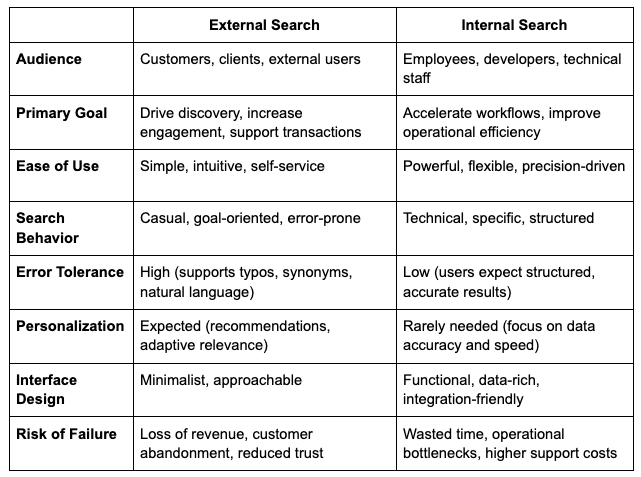
The fundamental difference between external and internal search lies in their user experience (UX) priorities.
The table below outlines the contrast:
Why UX strategy matters?
Treating both types of search as identical leads to avoidable risks:
- For external search, poor UX results in user frustration, lost conversions, and brand erosion.
- For internal search, inefficiencies manifest as slower operations, increased onboarding time, and unnecessary support escalations.
A one-size-fits-all approach undermines the potential of search to deliver value. Instead, product teams must recognize that each type of search requires its own UX strategy, aligned to its users' needs and business objectives.
Supporting Both Dashboards and Custom Interfaces
UX needs also depend on how enterprise search is implemented—whether through pre-built dashboards or fully custom-built interfaces.
Some teams rely on out-of-the-box dashboards (such as OpenSearch Dashboards) for immediate search access. Others use APIs to build search directly into their apps, workflows, or tools.
At Lucenia, we support both paths:
- For dashboard-driven implementations, we provide a modern, self-hosted UI that is clean, intuitive, and role-aware. Teams can deploy powerful search without needing to build frontends from scratch—ideal for operational oversight, compliance, and non-technical users.
- For teams building their own experiences, Lucenia offers a flexible, API-first architecture. Developers can design highly tailored UIs while leveraging our advanced search logic, geospatial capabilities, and access controls under the hood.
In both cases, the outcome is the same: users get fast, relevant, secure search experiences that match their specific context and needs.
A Platform That Brings Both Worlds Together
Too often, organizations are forced to choose between search solutions optimized for customers or employees. This is leading to fragmented systems, duplicated effort, and inconsistent user experiences.
At Lucenia, we believe you shouldn't have to choose. Our platform is built to bring harmony between external and internal search needs, enabling teams to manage and deliver both from a unified, scalable foundation.
We offer:
- Flexible APIs and developer tools that adapt to complex internal workflows
- User-friendly UI components optimized for external discoverability
- Advanced relevance models and real-time indexing that serve both technical and non-technical audiences
- Built-in geospatial and natural language capabilities to bridge the gap between structured queries and casual search behavior
By delivering a platform that supports the unique UX priorities of both outward-facing and inward-facing search, Lucenia empowers organizations to provide a seamless, efficient, and scalable search experience across their entire digital ecosystem.
Conclusion
Enterprise search is not a single problem with a single solution. It has two distinct challenges—external and internal search—each with its own audience, UX requirements, and business impact.
Recognizing this divide and investing in UX strategies tailored to each use case is the key to unlocking the full potential of enterprise search.
In our next post, we will explore the hidden costs associated with both external and internal search—and why organizations often underestimate the long-term impact of poorly designed search systems.