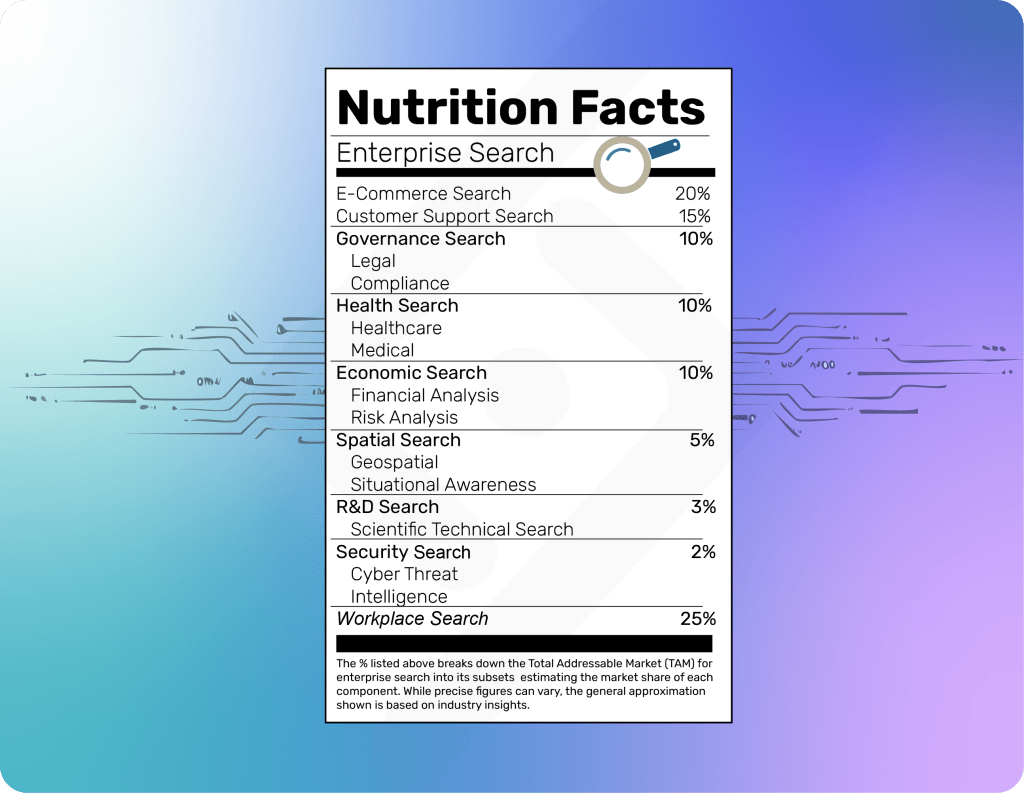
The Difference Between Enterprise Search and Workplace Search: Clearing Up the Confusion

When it comes to finding information efficiently within an organization, terms like "enterprise search" and "workplace search" are often used interchangeably. However, while they share similarities, they serve distinct purposes and address different challenges. Understanding the difference is crucial for businesses looking to optimize search solutions and enhance productivity.
What is Enterprise Search?
Enterprise search refers to the capability of searching across an entire organization's structured and unstructured data, regardless of where it is stored. This includes databases, document management systems, intranets, cloud storage, emails, and even external sources. Enterprise search is designed to provide comprehensive, organization-wide visibility and is often used for compliance, knowledge management, and improving decision-making. Unlike workplace search, enterprise search extends beyond internal data sources and incorporates external sources that add critical context. For example, organizations can integrate social sentiment analysis with customer service data to gauge market perception, or leverage external feeds like real-time weather, traffic conditions, video, and drone footage for situational awareness. This level of integration enables businesses to make data-driven decisions in real time.
A true enterprise search company supports all these capabilities but should also be geospatially aware—understanding that information has context in both space and time. For instance, recognizing that social sentiment for your company is declining is useful, but knowing that the decline is concentrated in a specific region, such as Austin, TX, provides more actionable insights. This geospatial awareness empowers organizations to identify localized issues before they escalate and respond more effectively to dynamic situations.
Key Features of Enterprise Search:
- Scalability: Can handle massive datasets across various sources.
- Security & Compliance: Respects user permissions and data access controls.
- AI & Machine Learning Integration: Improves relevance through intelligent ranking and semantic search.
- Customizability: Can be tailored to industry-specific needs and regulations.
- Federated Search: Aggregates results from multiple repositories in real time.
Enterprise search is typically used by large organizations, legal teams, healthcare institutions, and government agencies that require deep, cross-platform search capabilities to manage and retrieve critical business information efficiently.
What is Workplace Search?
Workplace search, on the other hand, is a subset of enterprise search but is more focused on improving search experiences within an employee's daily workflow. Rather than indexing all enterprise data, workplace search is centered around commonly used collaboration tools, such as Google Drive, Slack, Microsoft 365, Jira, Confluence, and other productivity apps. It is designed to enhance employee efficiency by making it easier to locate work-related documents, messages, and project files.
Key Features of Workplace Search:
- User-Friendly Interface: Prioritizes ease of use with simple, intuitive search experiences.
- Integration with Collaboration Tools: Connects with the apps employees use daily.
- Personalized Results: Focuses on individual work contexts rather than organization-wide access.
- Lightweight & Fast: Optimized for quick access to recent and relevant files.
- Less Complexity in Implementation: Easier to deploy without requiring extensive IT customization.
Workplace search is particularly beneficial for small to mid-sized businesses or teams within larger enterprises that need an efficient way to access their daily work materials without dealing with the complexity of enterprise-wide search solutions.
However, workplace search is also the most likely area to be disrupted by AI agents. Setting up an AI model to scan and contextualize data from sources like Google Drive, email, and Slack is becoming increasingly feasible. This shift could make standalone workplace search tools redundant in the near future, as AI-driven assistants become more capable of retrieving relevant information in real time.
Why the Distinction Matters
Understanding the difference between enterprise search and workplace search helps organizations make informed decisions when selecting search solutions. If your organization needs to search across complex, multi-platform datasets while maintaining strict security compliance, enterprise search is the right choice. If your goal is to improve productivity by making workplace tools more searchable and accessible for employees, workplace search is the better fit.
Ultimately, both solutions aim to streamline information retrieval, but their scope and implementation differ. By recognizing these differences, businesses can avoid confusion and invest in the right search technology to meet their specific needs.
Which is Lucenia?
Lucenia does both!
Lucenia is a comprehensive enterprise search solution that also includes workplace search capabilities, powered by natural language processing combined with retrieval-augmented generation with public or private LLMs. Workplace search is a relatively easy problem to solve and is increasingly influenced by AI agent disruption. In contrast, enterprise search is far more complex, requiring robust security measures, scalability, and visibility across structured and unstructured data both inside and outside the enterprise. This distinction is critical, as enterprise search will remain a difficult yet essential problem to solve. Lucenia is designed to address both challenges, ensuring organizations have a solution that supports enterprise-wide knowledge discovery and everyday workplace efficiency.
Lucenia is built by the enterprise search experts and founder of OpenSearch. Lucenia specializes in advanced search solutions tailored to the evolving needs of enterprises and workplaces. Whether you need scalable enterprise search capabilities or an intuitive workplace search experience, we can help. Contact us to learn more!
Get started today with just one command. Or try us out on Amazon Marketplace